
Introduction
Git and GitHub are foundational technologies for modern software development.
As applications evolve, developers and teams constantly make changes—adding features, fixing bugs, improving performance, updating dependencies, addressing security issues, and preparing new releases. When several people are working on the same project, keeping track of these changes and understanding how they fit together becomes increasingly important.
This is where Git and GitHub play an important role in modern software development.
Git provides the version-control foundation for tracking changes, maintaining project history, creating branches, and working safely on different parts of a project.
GitHub builds on Git by providing an online development and collaboration platform where repositories can be hosted, changes can be reviewed, teams can collaborate, workflows can be automated, and additional development and security capabilities can be integrated.
Although Git and GitHub are closely related, they are not the same thing.
Understanding that distinction is one of the first steps toward understanding how modern development workflows operate.
Why Git and GitHub Matter
Imagine a software project being developed by several people at the same time.
One developer is building a new feature. Another is fixing a production issue. Someone else is reviewing changes, while another team member is preparing the next release.
Without a reliable way to track and organize these changes, development can quickly become difficult to manage.
Git provides mechanisms for recording changes and maintaining the project’s history.
GitHub adds collaboration capabilities around those repositories, allowing developers and teams to work together through features such as pull requests, code reviews, issues, automation, security controls, and other development tools.
A simplified development workflow can look like this:
Plan
↓
Develop
↓
Commit
↓
Review
↓
Test
↓
Merge
↓
Build
↓
Deploy
↓
Maintain
Git manages the version-control aspects of this process, while GitHub can connect the repository with collaboration, review, automation, security, and other development capabilities.
This makes Git and GitHub useful not only for individual developers, but also for development teams, technical leads, architects, DevOps engineers, engineering managers, and other professionals involved in software delivery.
What This Guide Covers
This guide is designed to provide a practical and understandable introduction to Git and GitHub while also giving experienced developers useful perspectives on how these technologies fit into broader software-development workflows.
We will begin with the fundamentals:
- What Git is
- What GitHub is
- How Git and GitHub differ
- How repositories work
- How branches and commits are used
- How pull requests support collaboration
We will then explore important GitHub capabilities, including:
- GitHub Actions
- GitHub Copilot
- GitHub Codespaces
- GitHub security features
The guide also covers practical best practices, advantages, limitations, frequently asked questions, and engineering perspectives for using Git and GitHub effectively.
The deeper technical subjects that require more detailed treatment can be explored through dedicated articles as part of the broader Git and GitHub content series.
Who Is This Guide For?
This guide is intended for a broad technical audience.
If you are new to Git and GitHub, the article will help you understand the fundamental concepts and how they fit together.
If you are already an experienced developer, the guide provides a consolidated view of Git and GitHub capabilities and how they can support modern development workflows.
It can also be useful for:
- Technical leads
- Solution architects
- Engineering managers
- DevOps engineers
- Project and engineering teams
- Students and developers building their technical foundations
- Professionals evaluating GitHub for team development
You do not need to know every Git command or every GitHub feature to benefit from this guide.
The goal is to build a clear understanding of the fundamentals first and then show how those fundamentals connect to the wider software-development lifecycle.
Git and GitHub: More Than Source-Code Storage
It is easy to think of Git simply as a tool for storing code and GitHub simply as a website where repositories are hosted.
That view is incomplete.
Git provides the foundation for managing change and maintaining project history.
GitHub can extend that foundation into a connected development environment covering collaboration, code review, automation, security, project coordination, and other development activities.
The value comes from how these capabilities work together.
Instead of treating version control, collaboration, review, testing, security, and delivery as completely isolated activities, teams can connect them into a more structured development workflow.
That is the broader context in which Git and GitHub are used today.
What You Will Learn
By the end of this guide, you should have a clear understanding of:
- Git — what it is, why version control matters, and how it helps developers manage changes.
- GitHub — what it provides beyond Git and how it supports collaboration and software development.
- Git vs GitHub — the practical differences between the two and when each is involved.
- Core Git concepts — repositories, branches, commits, and pull requests.
- GitHub capabilities — automation, AI-assisted development, cloud development environments, and security.
- Best practices — practical principles for maintaining a clean, reliable, and manageable workflow.
- Advantages and limitations — where Git and GitHub provide value and what teams should consider when adopting them.
The objective is not to memorize every command or feature.
The objective is to understand how Git and GitHub fit together and how they can be used intentionally to build, collaborate on, review, secure, and maintain software projects.
Let’s begin with the foundation: What is Git?
What Is Git?
Git is a distributed version control system used to track changes in files and maintain the history of a project. In practical terms, Git version control gives developers a reliable way to manage changes without losing project history. Git documentation
Although Git is most commonly associated with software source code, it can also be used to manage documentation, configuration files, and other types of project files.
The key idea behind Git is simple: instead of keeping only the latest version of a project, Git records how the project changes over time.
This gives developers a reliable history that can be used to understand what changed, compare versions, investigate problems, and return to earlier states when necessary.
Why Do Developers Need Git?
Software projects change continuously. Developers may add new features, fix bugs, refactor existing code, update dependencies, improve performance, modify configuration, or experiment with new approaches.
Without version control, tracking these changes and understanding how a project evolved can become difficult. Git provides a structured way to record and manage these changes over time.
Instead of relying on manually created copies such as project-final, project-final-new, or project-final-latest, Git maintains a structured history within the repository. This makes it easier to understand what changed, compare different versions, investigate problems, and return to an earlier state when necessary.
Git Is a Distributed Version Control System
One of Git’s most important characteristics is that it is a distributed version control system. When a developer clones a Git repository, they normally receive the project’s files together with its Git history, allowing much of the development work to be performed locally.
Developers can create commits, inspect project history, create branches, and compare changes without continuously depending on a remote hosting service. Changes can be synchronized with a remote repository when collaboration or sharing is required.
This distributed model provides flexibility because Git can operate independently on a developer’s computer.
A platform such as GitHub can then extend Git by providing repository hosting, collaboration, code review, automation, security, and other development capabilities.
The key distinction is simple: Git does not depend on GitHub. Git can be used independently, while GitHub provides additional services around Git-based development.
Git Tracks Project History
Git records the evolution of a project through a history of changes. Each recorded change provides information about what was changed and helps developers understand how the project developed over time.
This history can be used to review previous changes, compare versions, investigate problems, and understand when and why changes were introduced.
Git stores this history through commits, which represent recorded points in the project’s development. Commits will be discussed in greater detail later in this guide.
The important idea at this stage is that Git provides a structured history rather than relying on manually maintained copies of project files.
Git Uses Branches for Isolated Development
Git also supports branches, which allow developers to work on different features, fixes, experiments, or other changes independently.
A branch provides a separate line of development within the same repository, allowing work to progress without immediately affecting another development line.
Branches are an important part of collaborative Git workflows and will be covered in greater detail later in this guide.
A Typical Git Workflow
A basic Git workflow can be represented as:
Create / Clone Repository
↓
Create Branch
↓
Make Changes
↓
Stage Changes
↓
Commit
↓
Push / Sync
↓
Review / Merge
The exact workflow varies depending on the project, team, and development practices. For an individual developer, the process may remain relatively simple. In a collaborative team, additional activities such as Pull Requests, code reviews, automated testing, security checks, and deployment can be incorporated into the workflow.
The important idea is that Git provides the version-control foundation, while platforms such as GitHub can extend that workflow with collaboration, review, automation, security, and other development capabilities.
Git and Remote Repositories
A developer may work with a local Git repository and push changes to a remote repository. Other developers can then fetch or pull those changes into their own local repositories and continue working on the project.
A simplified model is:
Developer A
│
Local Git Repository
│
Push
↓
Remote Repository
↑
Pull
│
Local Git Repository
│
Developer B
Git provides the version-control mechanisms for tracking and synchronizing changes. A hosting platform such as GitHub can provide a shared environment around Git repositories and add collaboration, code review, automation, security, and other development capabilities.
Git and GitHub Are Different
It is important to understand that Git and GitHub are related, but they are not the same thing.
Git is a distributed version-control system that tracks changes and maintains project history. Pro Git book
GitHub is a platform built around Git repositories that provides hosting, collaboration, code review, automation, security, and other development capabilities.
Git
│
├── Tracks changes
├── Maintains history
├── Creates commits
├── Supports branches
└── Integrates changes
│
▼
GitHub
│
├── Hosts Git repositories
├── Supports collaboration
├── Provides Pull Requests
├── Enables code review
├── Supports automation
├── Provides security capabilities
└── Adds other development services
Git provides the underlying version-control foundation, while GitHub builds a broader collaboration and development environment around Git repositories.
Why Git Remains Important
Git provides a foundation that can scale from a personal project to a large software-development organization.
A developer working alone can use Git to maintain a clear project history, experiment safely, and manage changes over time.
Development teams can build structured workflows around Git using branches, commits, collaboration and review processes, automated checks, and deployment practices.
Git does not require every project or team to follow the same workflow. Instead, development practices should evolve according to the project’s size, team structure, technical requirements, and business needs.
This flexibility is one of Git’s strengths: the underlying version-control foundation remains consistent while teams can adapt their workflows as their projects grow and their requirements change.
Key Takeaway
Git provides the version-control foundation for managing changes throughout the life of a project.
Its core capabilities include:
Tracking changes
Maintaining project history
Creating branches
Recording commits
Comparing versions
Integrating changes
Working with local and remote repositories
Understanding these fundamentals makes the broader Git and GitHub ecosystem easier to understand.
What Is GitHub?
GitHub as a Platform
GitHub is a platform built around Git repositories. It provides repository hosting and adds collaboration, code review, Pull Requests, automation, security, and other development capabilities.
Git and GitHub Together
Git can be used independently. GitHub extends Git-based development with shared services and workflows that help individuals and teams collaborate around repositories.
GitHub for Individual Developers
Individual developers can use GitHub to maintain projects, build a public portfolio, share source code, contribute to open-source projects, and demonstrate practical development work.
Open-source software development
GitHub for Development Teams
For teams, GitHub can provide a shared environment around repositories, branches, commits, Pull Requests, reviews, automated checks, security controls, and deployment workflows.
Git vs GitHub: What’s the Difference?
The Core Distinction
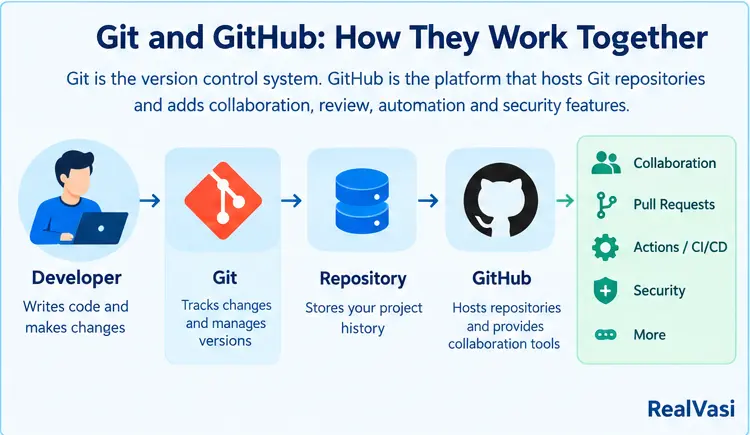
Git is the underlying distributed version-control system; GitHub is an online development and collaboration platform built around Git repositories.
Simple Comparison
Git primarily manages project changes, history, branches, and commits. GitHub hosts repositories and provides tools for collaboration, review, automation, security, and related development activities.
How Git and GitHub Work Together
Git manages local version-control operations while GitHub provides the shared platform around the repository. A typical flow can move from branch and commit to push, Pull Request, review, checks, and merge.
Key Features of GitHub
Core GitHub Features
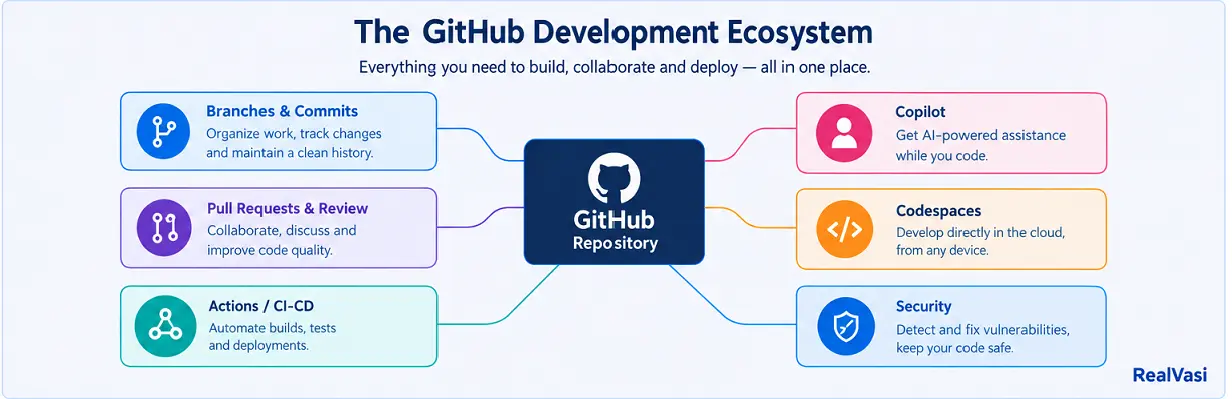
GitHub brings repository hosting, collaboration, Pull Requests, code review, automation, security, and other development capabilities together in one ecosystem.
A Broader View of the GitHub Ecosystem
The major capabilities include repositories; branches and commits; Pull Requests; GitHub Actions; GitHub Copilot; GitHub Codespaces; security features; and issues or project-management capabilities.
How These Features Work Together
A typical flow can connect an issue or requirement with a branch, commits, a Pull Request, review, automated checks, security checks, merging, and delivery. Not every project needs every capability. GitHub platform
Git Repositories
Repository Overview
A repository contains a project’s files together with its Git history. On GitHub, it can become a shared collaboration hub for code, documentation, configuration, issues, reviews, and other project information. GitHub repositories
What Can a Repository Contain?
A repository may contain source code, configuration, documentation, tests, scripts, build or deployment files, and infrastructure configuration. Its structure should reflect the technology and requirements of the project.
Repository and Git History
A repository is not simply a place to store the latest copy of project files. Git records changes through commits so developers can inspect history, compare changes, investigate problems, and understand project evolution.
Local Git Repository vs GitHub Repository
A developer can manage a Git repository locally and connect it to a remote repository hosted on GitHub. Git manages version control; GitHub provides the online hosting and collaboration environment. A Git repository does not have to be hosted on GitHub.
Public and Private Repositories
Repositories can be public or private depending on sharing and access requirements. Public repositories are common for open source, learning, portfolios, and public documentation; private repositories are common for proprietary, internal, commercial, client, or restricted work.
The README File
A useful README should give someone unfamiliar with the project enough information to understand it and get started. It may cover the overview, technology stack, installation, configuration, usage, testing, contribution guidance, licensing, and further documentation.
Repository Structure Matters
A clear structure makes development, onboarding, review, maintenance, and troubleshooting easier. Unrelated or obsolete material should not accumulate without a reason.
Repository Settings and Access
Settings can control access, contributions, administration, branch protection, automation, collaboration, and security. Access should generally follow least-privilege principles.
Repository as a Collaboration Hub
A GitHub repository can connect source code with work tracking, documentation, Pull Requests, code review, automated checks, and project context.
Repositories for Individual Developers
For an individual developer, a repository provides a structured way to manage a project, maintain history, document work, and demonstrate practical experience.
Repositories for Teams
For teams, the repository can become a shared foundation for development, review, testing, security, deployment, and collaboration.
What Makes a Good Repository?
A good repository is understandable, organized, appropriately documented, accessible to the right people, and maintained over time.
Repository Best Practices
Keep the structure clear, maintain a useful README, control access appropriately, protect important branches, and treat the repository as a project record.
Go Deeper
Supporting guide: GitRepositories — detailed repository structure, access, collaboration, and best practices.
Git Branches
Branch Overview
Branches provide separate lines of development so developers can work on features, fixes, experiments, or other changes without immediately affecting another development line.
Branches in Collaboration
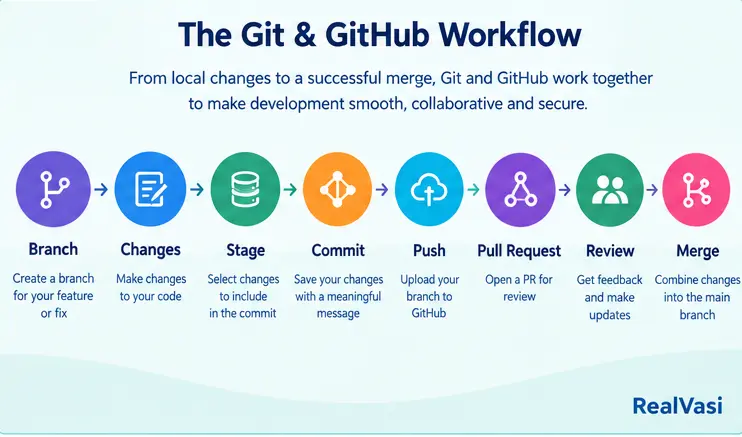
Branches can be combined with Pull Requests and code review. A developer can create a local branch, commit changes, push the branch to GitHub, and use it as the basis for a Pull Request.
Branch Protection
Important branches may require Pull Requests, approvals, successful automated checks, or restrictions on direct pushes.
Keeping Branches Manageable
Unnecessary or abandoned branches can make a repository harder to understand. Completed branches can generally be removed after successful integration.
Branching Strategies
Different teams use different strategies. A small team may use a simple main-plus-feature model, while larger organizations may introduce additional development or release branches. Complexity should solve a real problem.
Go Deeper
Supporting guide: Git Branches — practical branching workflows, strategies, and best practices.
Git Commits
Commit Overview
A commit represents a recorded point in a project’s development history. Commits provide a structured record of what changed.
Meaningful History
A useful commit history makes it easier to review changes, compare versions, investigate problems, and understand when and why changes were introduced.
Commits in a Collaborative Workflow
Commits can be created locally and synchronized with a remote repository. Focused commits can support clearer review and make change history easier to understand.
Go Deeper
Supporting guide: Git Commits — staging, committing, inspecting history, and practical commit practices.
GitHub Pull Requests
Pull Request Overview
Pull Requests provide a structured way to propose, discuss, review, validate, and integrate changes in a GitHub repository.
Collaboration and Review
Pull Requests connect branch-based development with discussion, code review, automated checks, security checks, and merging.
Checks and Integration
A Pull Request can bring together human review and automated validation before a change is merged. The exact rules depend on the repository and team.
Go Deeper
Supporting guide: GitHub Pull Requests — detailed workflow, review practices, checks, merging, and common mistakes.
GitHub Actions
Automation Overview
GitHub Actions provides repository-based automation. Workflows can respond to pushes, Pull Requests, schedules, or manual triggers.
Workflows, Jobs, and Steps
A workflow contains jobs, and jobs contain steps. Runners execute jobs using GitHub-hosted or self-hosted infrastructure.
CI/CD
A common use is Continuous Integration and Continuous Delivery or Deployment, connecting source-code changes with repeatable build, test, validation, and delivery processes.
Automation Beyond CI/CD
Actions can also automate scheduled maintenance, issue-related tasks, artifact generation, scripts, repository events, and other repeatable activities.
Go Deeper
Supporting guide: GitHub Actions / CI/CD — workflow design, automation, testing, builds, and deployment patterns.
GitHub Copilot
AI-Assisted Development
GitHub Copilot can assist developers with coding, tests, documentation, unfamiliar technologies, and investigation of problems.
Responsible Use
Developers remain responsible for correctness, security, performance, maintainability, business requirements, testing, and final engineering decisions. Generated output should be reviewed and validated.
Practical Perspective
AI assistance should be treated as part of an engineering workflow, not a replacement for engineering judgment.
Go Deeper
Supporting guide: GitHub Copilot — practical AI-assisted development and responsible-use guidance.
GitHub Codespaces
Cloud Development Environment
GitHub Codespaces provides a cloud-hosted development environment in a development container on a virtual machine. It can be accessed through a browser, Visual Studio Code, or GitHub CLI.
Why It Matters
Codespaces can reduce local setup effort and help teams create more consistent development environments.
Codespaces and Git
Codespaces does not replace the Git workflow. Developers can create branches, modify files, run tests, create commits, push changes, and open Pull Requests.
Use Cases and Considerations
Codespaces can help with remote development, onboarding, working across machines, and projects where local setup is difficult. Connectivity, configuration, usage, cost, and security still need consideration.
Go Deeper
A dedicated Codespaces guide can be added later if setup, configuration, and advanced usage warrant separate treatment.
GitHub Security Features
Security Overview
GitHub provides security capabilities around repositories and development workflows. Security considerations can be integrated with source changes, dependencies, automation, and collaboration.
Dependency Security
Dependency awareness and tools such as Dependabot can help teams identify and address dependency-related risks.
Repository Access and Protection
Appropriate permissions, protected branches, repository rules, required reviews, and related controls can reduce avoidable risks.
Broader Security Model
GitHub security capabilities complement rather than replace secure engineering. Secret management, architecture, coding practices, testing, access management, and maintenance remain important.
Go Deeper
Supporting guide: GitHub Security — repository security, dependency management, alerts, and practical security workflows.
Git and GitHub Best Practices
Practical Checklist
Use clear repositories, meaningful branches and commits, structured Pull Requests, appropriate review, useful automation, security checks, and workflows that fit the project’s size and team.
Keep Practices Proportional
Practices should evolve with project size, team structure, technical requirements, application criticality, and business needs.
Maintain the Development Record
Treat Git history, documentation, Pull Requests, and project context as valuable records.
Use Automation and AI Carefully
Automate repetitive checks where they provide value, but keep automation maintainable. Use AI tools as assistants and retain engineering review.
Keep Security Part of Development
Security should be considered throughout the workflow rather than added only at the end.
RealVasi Expert Tips for Git and GitHub
Practical Perspective
Git and GitHub work best when treated as part of an engineering process rather than simply as a place to store source code.
Keep the Repository Understandable
A repository should communicate the structure and purpose of the project clearly. Good documentation and organization reduce friction.
Keep Workflows Simple
Start with a clear process and add complexity only when the project needs it.
Make Git History Useful
Focused commits and understandable changes create a practical project record for review, troubleshooting, and maintenance.
Review Before Integration
Important changes should have an appropriate review and validation path before reaching important branches.
Automate What Makes Sense
Automation is valuable when it removes repetitive work or provides reliable feedback. Avoid automation that becomes harder to maintain than the problem.
Build Security Into the Process
Use appropriate permissions, protect important branches, manage dependencies and secrets carefully, and use meaningful security checks.
Scale Practices With the Project
Introduce protected branches, testing, scanning, CODEOWNERS, dependency management, or repository rules when they solve real problems.
Key Perspective
The objective is not to use every GitHub feature available. The objective is to use the right practices and controls while keeping development understandable, collaborative, reviewable, secure, and maintainable.
Advantages of Git and GitHub
Key Benefits
Together, Git and GitHub can provide traceable project history, flexible branching, collaboration, code review, automation, security capabilities, and workflows that scale from individual projects to larger teams.
Reliable Version History
Git provides a structured record of project changes.
Parallel Development
Branches allow different lines of work to progress independently.
Collaborative Review
Pull Requests provide a structured way to discuss and validate changes.
Connected Development
Repositories can connect code with documentation, work tracking, automation, security, and other development activities.
Flexible Ecosystem
Teams can adopt the capabilities that provide meaningful value rather than using everything by default.
Disadvantages and Limitations of Git and GitHub
Practical Limitations
Git and GitHub introduce learning requirements, workflow decisions, configuration choices, and operational considerations.
Learning Curve
Branches, merging, rebasing, and history management can take time to learn.
Merge Conflicts
Parallel development can produce conflicts that require careful resolution.
Workflow Complexity
Overly complicated branching, review, automation, or governance can create unnecessary process.
Large Files
Large binary files and frequently changing assets can create repository-management challenges and may require Git LFS or other approaches.
Security Responsibility
GitHub security capabilities do not automatically make an application secure.
Maintenance Effort
Repositories can accumulate outdated branches, dependencies, workflows, documentation, and configuration.
Team Discipline
Collaboration depends on reasonable conventions for branches, commits, Pull Requests, reviews, and permissions.
Plan, Service, and Configuration Considerations
GitHub capabilities can vary by plan, configuration, and organizational requirements.
Automation and AI Require Oversight
Complex automation can become technical debt, while AI-generated code can contain errors or unsuitable assumptions.
History-Rewriting Risks
Resetting, rebasing, and force pushing can affect shared history and require care on shared branches.
Git and GitHub FAQ
What Is Git?
Git is a distributed version control system used to track changes and maintain project history. It can be used locally without GitHub.
What Is GitHub?
GitHub is a development and collaboration platform built around Git repositories. It adds hosting, collaboration, code review, automation, security, and other capabilities.
Is Git the Same as GitHub?
No. Git is the version control system; GitHub is a platform built around Git repositories.
Can Git Be Used Without GitHub?
Yes. Git can operate independently on a local computer or with other Git hosting platforms.
Is GitHub Free?
GitHub offers different account and plan options, and feature availability can vary. Current offerings should be checked when a project depends on a particular capability.
What Is a GitHub Repository?
A GitHub repository is a project workspace containing project files and Git history, with access and collaboration capabilities determined by the project.
What Is a Git Branch?
A branch is an independent line of development within a repository, commonly used for features, fixes, experiments, or other isolated work.
What Is a GitHub Pull Request?
A Pull Request proposes changes for discussion and review before they are merged into a target branch.
What Is GitHub Actions?
GitHub Actions is GitHub’s automation platform for activities such as testing, building, security checks, packaging, and deployment.
What Is GitHub Copilot?
GitHub Copilot is an AI-powered development assistant that can support coding, testing, explanations, and other development tasks. Its output still requires developer review.
What Are GitHub Codespaces?
Codespaces provides cloud-hosted development environments associated with repositories and can support consistent environments and remote development.
Is GitHub Secure?
GitHub provides security capabilities, but secure configuration, permissions, secret management, secure development practices, and application design remain important.
What Is the Difference Between GitHub and GitLab?
Both provide Git-based development platforms with overlapping capabilities. The appropriate choice depends on project, workflow, integration, administration, and organizational requirements.
Is GitHub Suitable for Beginners?
Yes. Beginners can start with repositories, commits, branches, Pull Requests, and merging, then learn more advanced capabilities progressively.
Why Do Developers Use GitHub?
Developers use GitHub for repository hosting, collaboration, code review, automation, security, project development, and related capabilities.
Conclusion
Start With the Fundamentals
Developers do not need to learn every feature immediately. A strong foundation comes from understanding repositories, commits, branches, Pull Requests, and merging before progressively adopting more advanced capabilities.
Choose the Right Level of Complexity
A personal project, small team, and business-critical application may require different levels of review, automation, security, and governance.
Technology Should Support Engineering
Git and GitHub should support the engineering process rather than become process for its own sake.
The RealVasi Perspective
Start with a clear and manageable process, then introduce additional controls when they provide meaningful value.
Final Takeaway
Git provides the version-control foundation for managing changes and project history. GitHub builds a broader platform around Git repositories for hosting, collaboration, review, automation, security, and other development activities. Use this Master Guide as the central starting point, then follow focused supporting articles for deeper treatment.