
Introduction
Git repositories are central workspaces used to manage projects with Git. They bring together project files and the version history that records how those files change over time. When a repository is hosted on GitHub, it can also become a shared environment for collaboration, code review, automation, security, and related development activities.
This guide looks at repositories from a practical perspective: what they contain, how local and GitHub repositories relate, how public and private repositories differ, why README files and structure matter, and how Git repositories support individual developers and teams.
Git’s official documentation on getting a repository
A Git repository is a project location managed by Git for tracking changes and maintaining project history. It can contain source code, documentation, configuration, tests, scripts, and other resources required by a project.
The repository is more than a folder containing the latest files. Git maintains the project’s history so developers can understand how the project evolved, compare changes, investigate problems, and work with different versions. A repository can exist locally on a developer’s computer, remotely on a hosting platform such as GitHub, or as part of a workflow connecting local and remote Git repositories.
What Can a Repository Contain?
There is no universal Git repositories structure that fits every project. The contents and organization should reflect the technology, requirements, and development process.
A typical application repository might include:
my-web-application/
├── src/
├── public/
├── tests/
├── docs/
├── scripts/
├── package.json
├── README.md
├── .gitignore
└── deployment configuration
Repository and Git History
One of the important characteristics of a Git repository or Git repositories is that it maintains project history. Commits provide a record of changes and allow developers to understand how the project evolved.
This history can be useful when comparing versions, investigating problems, reviewing changes, or returning to an earlier state. For collaborative projects, a meaningful history also provides useful context around development work.
Local Git Repository vs GitHub Repository
A local Git repository exists on a developer’s computer and provides the Git version-control foundation. Git can manage changes locally without requiring a remote hosting service.
A GitHub repository provides online hosting and adds services around the Git repository, including sharing and collaboration capabilities. A local repository can be connected to a GitHub repository so developers can push changes to and pull changes from the remote repository.
Git does not require GitHub. GitHub is one platform built around Git-based development.
GitHub’s documentation on repositories
Repository visibility is an important part of how a project is shared and managed.
Public repositories can be discovered and viewed by others and are commonly used for open-source projects, learning, public documentation, portfolios, and community contributions.
Private repositories restrict access to authorized users or teams and are commonly used for proprietary, internal, commercial, client, or otherwise restricted work.
Visibility should be considered together with access permissions and the project’s security requirements.
The README File
The README is often one of the first files an unfamiliar developer encounters in a repository. Its purpose is to provide enough practical information to understand the project and get started.
A useful README may include an overview, key features, technology stack, installation or configuration guidance, instructions for running and testing the project, usage examples, contribution guidance, licensing information, and links to more detailed documentation.
The README should make the project easier to understand without attempting to replace detailed technical documentation.
Repository Structure Matters
A repository / Git respositories should have a structure that is clear, predictable, and maintainable. Common areas may include source code, tests, documentation, scripts, and configuration, but the exact layout should reflect the project.
Unrelated, obsolete, generated, or temporary files should not accumulate without a reason. A clear structure helps development, onboarding, code review, maintenance, and troubleshooting.
GitHub’s repository management documentation
Repository settings can influence access, collaboration, administration, branch protection, automation, and security controls. Access should be appropriate to each person’s responsibilities, following a least-privilege approach where practical.
Repository settings can support governance through protected branches, required reviews, automated checks, repository rules, and security controls. However, settings alone do not guarantee security. Permissions, development practices, reviews, credential management, and ongoing maintenance remain important.
A Repository as a Collaboration Hub
A repository can become a central collaboration hub connecting project files with branches, commits, issues or work items, Pull Requests, reviews, automated checks, and documentation.
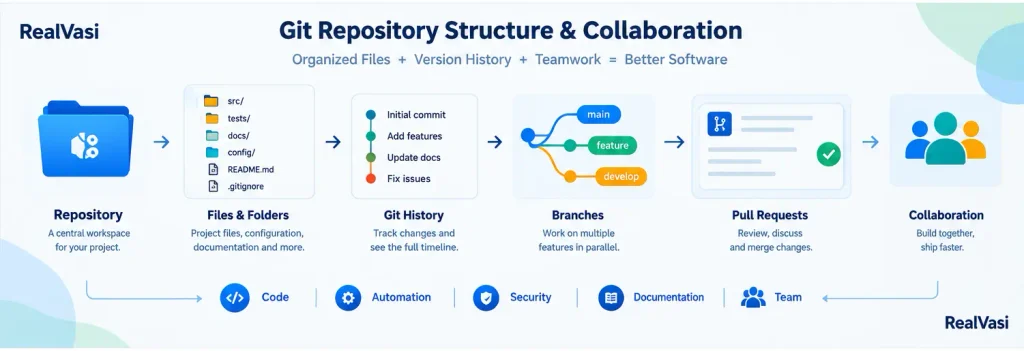
A typical development flow can connect an issue or requirement with a feature branch, development work, commits, a Pull Request, code review, automated checks, and eventually a merge. Not every project needs every capability, so repository workflows should remain proportional to project requirements.
Git Repositories for Individual Developers
For an individual developer, a repository provides structure from initial development through ongoing maintenance. It keeps project files and Git history together and provides a consistent way to manage changes.
A public repository can also serve as a technical portfolio by demonstrating projects, technologies, documentation, development practices, Git workflows, and practical work. Its primary purpose, however, remains effective development, version control, collaboration where applicable, and maintenance.
Repositories for Development Teams
For a development team, the repository provides a shared foundation around which the development process can be organized.
A typical workflow may look like:
Repository → Issue/Requirement → Feature Branch → Development → Commits → Pull Request → Code Review → Automated Checks → Merge
As projects become more complex, teams may use protected branches, required reviews, automated testing, security checks, dependency management, repository rules, and access controls. The exact workflow depends on project, team, security, and deployment requirements.
What Makes a Good Repository?
A good repository should make it reasonably easy for someone to understand the project, get started, make changes, follow the development process, and maintain the code over time.
Useful questions include: What does the project do? How is it structured? How is it configured and run? How is it tested? Where should changes be made? How does collaboration work? What rules apply?
A practical foundation is a clear structure, useful README, meaningful Git history, appropriate access, and consistent development practices. The goal is clarity and maintainability rather than unnecessary complexity.
Git Repository Best Practices
Practical repository practices include:
• Keep the repository structure clear and logical.
• Maintain an up-to-date README.
• Avoid unnecessary generated, temporary, obsolete, or unrelated files.
• Keep unrelated projects separate unless there is an architectural reason to combine them.
• Use meaningful branch names.
• Keep commits focused and understandable.
• Protect important branches where appropriate.
• Review repository permissions and access.
• Never commit credentials or secrets.
• Review dependencies and security issues.
• Keep documentation current.
• Remove obsolete artifacts when they are no longer needed.
These practices should be proportional to the project’s requirements, team size, security needs, and lifecycle.
Key Takeaway
A Git repository is a central workspace for a Git-based project, bringing together project files, version history, documentation, configuration, tests, and other resources. A local Git repository provides the version-control foundation, while a GitHub repository can add online hosting, sharing, collaboration, review, automation, and security capabilities.
Clear structure, useful documentation, meaningful history, appropriate access, and consistent practices all contribute to a repository that is easier to develop, collaborate on, and maintain.
For a broader understanding of Git and GitHub, see the Git & GitHub Master Guide